
Apache Flink Fundamentals: A Quick Reference
The five things you end up using in nearly every Flink job: DataStream, keyBy, windows, watermarks and state.
Flink processes events one at a time, as they arrive. Spark Structured Streaming, by default, groups events into small batches and handles one batch at a time, so once you add the batch interval on top of the processing time, end-to-end latency can drift into the seconds. Flink usually stays in the milliseconds. If you need to react right away (fraud checks, alerting, live personalization), that gap matters.
This post is a quick tour of five concepts that show up in almost every Flink job. If you’ve used Spark Streaming, most of them will look familiar.
- DataStream: the stream of events your job processes
- keyBy: splitting the stream by key so it can be processed in parallel
- Window: grouping events into finite chunks you can aggregate
- Watermark: tracking event-time progress and dealing with late data
- State: remembering what happened earlier in the stream
The examples use the Java DataStream API and current Flink conventions (1.19+ and 2.x), so you’ll see Duration where older code has Time.
1. DataStream
A DataStream is what your job actually works on: an immutable, usually never-ending sequence of events. Every Flink program has the same shape, which is a source, some transformations, and a sink.
- Source: where events come from (Kafka, Kinesis, files, sockets)
- Transformations:
map,filter,keyBy,window,processand friends - Sink: where results end up (Kafka, a database, S3, Elasticsearch)
Flink also keeps two clocks apart. Event time is when something really happened, read from a timestamp inside the event. Processing time is when Flink happens to get around to it. Event time gives you the same answer on every run, even when events show up late or out of order, and that’s the whole reason watermarks exist (more on those below).
StreamExecutionEnvironment env = StreamExecutionEnvironment.getExecutionEnvironment();

DataStream<SensorReading> readings = env.fromSource(
        kafkaSource,          // source
        watermarkStrategy,    // event-time handling (see Watermarks)
        "sensor-source");

readings
    .filter(r -> r.temperature > -50)   // transformation
    .sinkTo(kafkaSink);                  // sink

env.execute("Sensor Pipeline");
The rest of the examples use this small event class:
public class SensorReading {
    public String sensorId;
    public double temperature;
    public long timestamp;   // event time, epoch millis
}
2. keyBy (Grouping)
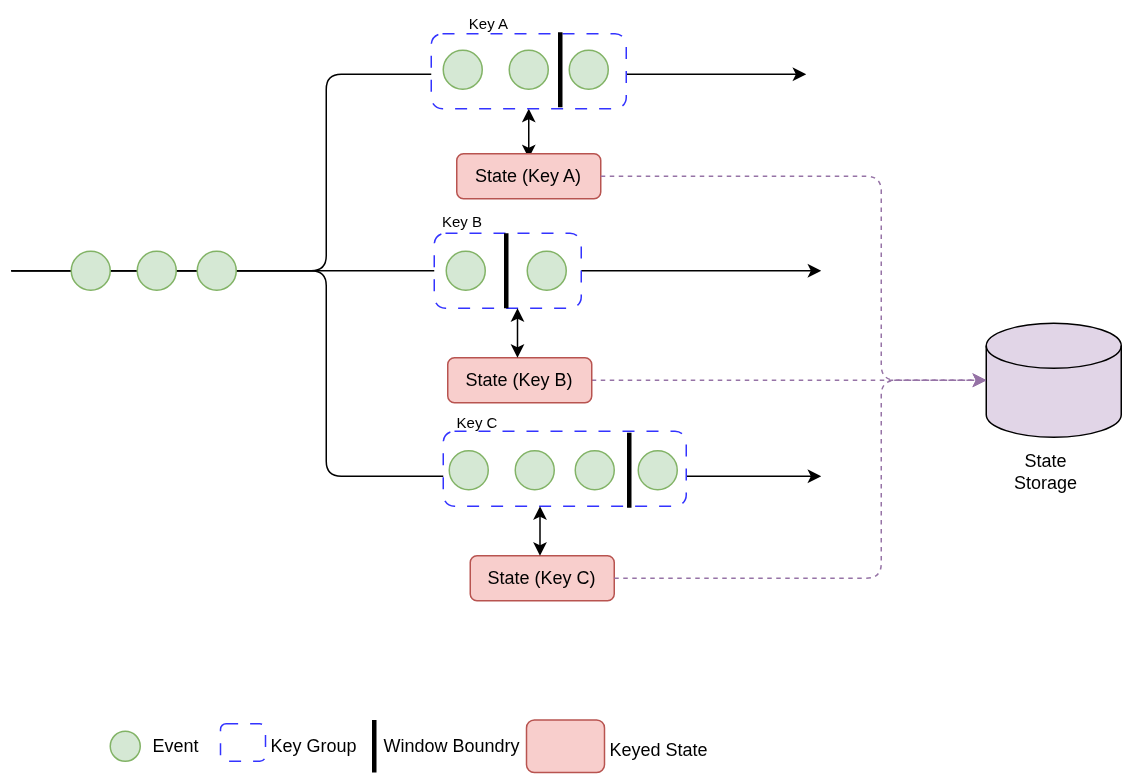
keyBy splits a stream into one logical stream per key. Every event with the same key lands on the same parallel task, so they can be handled together, while different keys spread out across the cluster.
Three things to keep in mind:
- It costs a network shuffle. Events get redistributed by the hash of their key, which means serialization and network traffic.
- The partitioning isn’t stored anywhere. It’s just routing that happens as events flow through.
- Keyed windows and keyed state both need it, so you’ll be writing
keyBya lot.
KeyedStream<SensorReading, String> bySensor = readings.keyBy(r -> r.sensorId);Pick a key that spreads evenly. If one “hot” key gets most of the traffic, one task ends up doing most of the work and everything queues behind it.
3. Window
Streams never end, but “average temperature” needs a finite set of events to average. A window gives you that finite set, and then you can sum, count or average over it.
The common window types:
| Window | Behavior | Example |
|---|---|---|
| Tumbling | Fixed size, no overlap | Count per minute |
| Sliding | Fixed size, overlapping; advances by a slide interval | 5-minute average updated every minute |
| Session | Closes after a gap of inactivity | User activity sessions |
| Global | One window per key; needs a custom trigger | Fire every 100 events |
Combined with keyBy, each key gets its own window, and they’re all evaluated in parallel.
Example: sliding window average
This computes a 5-minute average temperature per sensor, refreshed every minute. The AggregateFunction updates the average incrementally, so Flink keeps just a running sum and count per window instead of every event.
DataStream<String> avgTemps = readings
    .keyBy(r -> r.sensorId)
    .window(SlidingEventTimeWindows.of(Duration.ofMinutes(5), Duration.ofMinutes(1)))
    .aggregate(new AverageAggregate(), new AttachWindowInfo());

// Incremental aggregation: accumulator = (sum, count)
public static class AverageAggregate
        implements AggregateFunction<SensorReading, Tuple2<Double, Long>, Double> {

    @Override
    public Tuple2<Double, Long> createAccumulator() {
        return Tuple2.of(0.0, 0L);
    }

    @Override
    public Tuple2<Double, Long> add(SensorReading r, Tuple2<Double, Long> acc) {
        return Tuple2.of(acc.f0 + r.temperature, acc.f1 + 1);
    }

    @Override
    public Double getResult(Tuple2<Double, Long> acc) {
        return acc.f1 == 0 ? 0.0 : acc.f0 / acc.f1;
    }

    @Override
    public Tuple2<Double, Long> merge(Tuple2<Double, Long> a, Tuple2<Double, Long> b) {
        return Tuple2.of(a.f0 + b.f0, a.f1 + b.f1);
    }
}

// Adds the key and window end time to the aggregated result
public static class AttachWindowInfo
        extends ProcessWindowFunction<Double, String, String, TimeWindow> {

    @Override
    public void process(String sensorId, Context ctx,
                        Iterable<Double> averages, Collector<String> out) {
        double avg = averages.iterator().next();
        out.collect(String.format("sensor=%s windowEnd=%d avg=%.2f",
                sensorId, ctx.window().getEnd(), avg));
    }
}
4. Watermark
With event time, Flink needs some way to decide it has probably seen everything up to time T, so the window ending at T can fire. That’s what a watermark does. It’s a marker that travels along with the stream and says “event time has reached T.”
- You tell Flink how out of order your data can get, and it waits that long before closing windows.
- With a bounded out-of-orderness strategy, the watermark is roughly the highest event timestamp seen so far, minus that bound.
Lateness is controlled in three places:
- Out-of-orderness bound (on the watermark). How far the watermark trails the newest event. A bigger value tolerates more disorder but adds latency.
- Allowed lateness (on the window). How long the window’s state sticks around after it fires. A late event that lands inside that period updates the result, and the window fires again.
- Side output. Anything later than the allowed lateness would just be dropped, so a side output catches it and you can inspect it or reprocess it.
An event is accepted into a window as long as the watermark hasn’t passed the window end plus the allowed lateness.
A timeline example
Say you have a 1-minute tumbling window [12:00:00, 12:01:00), a 10-second out-of-orderness bound, and 30 seconds of allowed lateness.
- An event stamped
12:01:10arrives and the watermark moves to about12:01:00. The window fires. - Later, an event stamped
12:00:45shows up while the watermark is at12:01:20. It’s late but inside the allowed lateness, so the window fires a second time with the updated result. - Once the watermark passes
12:01:30, Flink throws the window’s state away. Anything else for that window goes to the side output.
Example: bounded out-of-orderness watermark
WatermarkStrategy<SensorReading> watermarkStrategy = WatermarkStrategy
    .<SensorReading>forBoundedOutOfOrderness(Duration.ofSeconds(10))
    .withTimestampAssigner((reading, recordTs) -> reading.timestamp)
    .withIdleness(Duration.ofMinutes(1));   // don't let idle partitions stall the watermark

DataStream<SensorReading> readings =
    env.fromSource(kafkaSource, watermarkStrategy, "sensor-source");

OutputTag<SensorReading> lateTag = new OutputTag<>("late-readings") {};

SingleOutputStreamOperator<Double> perMinuteAvg = readings
    .keyBy(r -> r.sensorId)
    .window(TumblingEventTimeWindows.of(Duration.ofMinutes(1)))
    .allowedLateness(Duration.ofSeconds(30))
    .sideOutputLateData(lateTag)
    .aggregate(new AverageAggregate());

// Events that missed even the allowed lateness
DataStream<SensorReading> tooLate = perMinuteAvg.getSideOutput(lateTag);
withIdleness deserves a mention because it catches people out. If one Kafka partition goes quiet, its watermark stops moving, and that holds back windows for the entire job. Marking idle partitions avoids it.
5. State
State is what turns Flink from a plain pipeline into something that can remember. An operator can hold on to past events and use them when deciding what to do with the current one.
Unlike the keyBypartitioning, state is durable. Flink checkpoints it periodically, and after a failure the job restores from the last checkpoint with exactly-once state consistency. Windows are built on state too: the running sum and count in the average example live in Flink’s managed state.
Typical uses
- Detecting patterns, like a small transaction followed by a large one
- Deduplication (have I seen this ID before?)
- Running aggregates and counters over the whole stream
- Incrementally updating an ML model from a stream of data points
State backends vs. checkpoint storage
People mix these two up all the time.
- The state backend is where live state sits while the job runs.
HashMapStateBackendkeeps objects on the JVM heap. It’s fast but limited by memory.EmbeddedRocksDBStateBackenduses RocksDB on local disk. It handles state far larger than memory and supports incremental checkpoints.
- Checkpoint storage is where snapshots of that state are written for recovery, normally a durable filesystem like S3, HDFS or GCS. JobManager memory is only for testing.
# config.yaml (Flink 1.20+/2.x key names)
state.backend.type: rocksdb
execution.checkpointing.interval: 60s
execution.checkpointing.dir: s3://my-bucket/flink/checkpoints
Kinds of state
| Type | Scope | Requires keyBy? | Common primitives |
|---|---|---|---|
| Keyed state | One value per key | Yes | ValueState, ListState, MapState, ReducingState |
| Operator state | One per parallel operator instance | No | ListState, UnionListState, BroadcastState |
Example: keyed ValueState with timers (fraud detection)
This detector flags an account when a transaction under $1 is followed by one over $500 within a minute. ValueState remembers the small transaction, and a processing-time timer makes it forget after a minute.
public class FraudDetector extends KeyedProcessFunction<String, Transaction, Alert> {

    private static final double SMALL = 1.00;
    private static final double LARGE = 500.00;
    private static final long ONE_MINUTE = 60_000L;

    private transient ValueState<Boolean> sawSmallTxn;
    private transient ValueState<Long> timerState;

    @Override
    public void open(OpenContext ctx) {   // Flink < 1.19: open(Configuration parameters)
        sawSmallTxn = getRuntimeContext().getState(
            new ValueStateDescriptor<>("saw-small-txn", Types.BOOLEAN));
        timerState = getRuntimeContext().getState(
            new ValueStateDescriptor<>("timer", Types.LONG));
    }

    @Override
    public void processElement(Transaction txn, Context ctx, Collector<Alert> out) throws Exception {
        if (sawSmallTxn.value() != null) {
            if (txn.amount > LARGE) {
                out.collect(new Alert(txn.accountId));
            }
            cleanUp(ctx);
        }

        if (txn.amount < SMALL) {
            sawSmallTxn.update(true);
            long timer = ctx.timerService().currentProcessingTime() + ONE_MINUTE;
            ctx.timerService().registerProcessingTimeTimer(timer);
            timerState.update(timer);
        }
    }

    @Override
    public void onTimer(long timestamp, OnTimerContext ctx, Collector<Alert> out) {
        // A minute passed with no large transaction, so forget the small one
        sawSmallTxn.clear();
        timerState.clear();
    }

    private void cleanUp(Context ctx) throws Exception {
        Long timer = timerState.value();
        if (timer != null) {
            ctx.timerService().deleteProcessingTimeTimer(timer);
        }
        sawSmallTxn.clear();
        timerState.clear();
    }
}

// Usage
transactions.keyBy(t -> t.accountId).process(new FraudDetector());
Example: keyed ListState (pattern over recent events)
This one alerts when a sensor’s last three readings are strictly increasing.
public class RisingTempDetector extends KeyedProcessFunction<String, SensorReading, String> {

    private transient ListState<Double> recentTemps;

    @Override
    public void open(OpenContext ctx) {
        recentTemps = getRuntimeContext().getListState(
            new ListStateDescriptor<>("recent-temps", Types.DOUBLE));
    }

    @Override
    public void processElement(SensorReading r, Context ctx, Collector<String> out) throws Exception {
        List<Double> temps = new ArrayList<>();
        recentTemps.get().forEach(temps::add);

        temps.add(r.temperature);
        if (temps.size() > 3) {
            temps.remove(0);
        }
        recentTemps.update(temps);

        if (temps.size() == 3 && temps.get(0) < temps.get(1) && temps.get(1) < temps.get(2)) {
            out.collect("Rising temperature on sensor " + r.sensorId + ": " + temps);
        }
    }
}
Example: operator state (checkpointed buffer)
Operator state belongs to a parallel operator instance instead of a key. A typical use is buffering records for batched writes without losing them on failure. CheckpointedFunction gives you hooks to snapshot and restore the buffer.
public class BatchingFlatMap extends RichFlatMapFunction<Event, List<Event>>
        implements CheckpointedFunction {

    private final int batchSize;
    private final List<Event> buffer = new ArrayList<>();
    private transient ListState<Event> checkpointedBuffer;

    public BatchingFlatMap(int batchSize) {
        this.batchSize = batchSize;
    }

    @Override
    public void flatMap(Event event, Collector<List<Event>> out) {
        buffer.add(event);
        if (buffer.size() >= batchSize) {
            out.collect(new ArrayList<>(buffer));
            buffer.clear();
        }
    }

    @Override
    public void snapshotState(FunctionSnapshotContext ctx) throws Exception {
        checkpointedBuffer.update(buffer);   // persist the in-flight buffer
    }

    @Override
    public void initializeState(FunctionInitializationContext ctx) throws Exception {
        checkpointedBuffer = ctx.getOperatorStateStore().getListState(
            new ListStateDescriptor<>("buffered-events", Event.class));

        if (ctx.isRestored()) {               // recovering from a failure
            for (Event e : checkpointedBuffer.get()) {
                buffer.add(e);
            }
        }
    }
}
If you change parallelism, Flink spreads operator ListState evenly over the new instances. With UnionListState, each instance gets the full list instead.
StateTtlConfigon the descriptor so it doesn’t grow without limit.Cheat Sheet
| Concept | What it does | Persisted? | Needs keyBy? |
|---|---|---|---|
| DataStream | The unbounded flow of events: source, transformations, sink | No | No |
| keyBy | Partitions the stream by key for parallel processing | No (routing only) | n/a |
| Window | Groups events into finite chunks for aggregation | Contents held in managed state | Optional, but usually yes |
| Watermark | Tracks event-time progress; decides when windows fire and what counts as late | No | No |
| State | Remembers past events to inform current decisions | Yes (checkpointed) | Keyed state: yes. Operator state: no. |
Rule of thumb: keyBy to parallelize, windows to aggregate, watermarks to get time right, and state to give the stream a memory.
Arul Systems helps enterprises design, build and scale data platforms, including real-time streaming pipelines that stay correct under late and out-of-order data. Get in touch to talk through your streaming architecture.